All guides
Getting started
What is Submittal Kit Create Your Workspace Your First Project Search Everything The Dashboard Help and What's New Abbreviations We UnderstandProjects & Schedule
Project Settings Schedule and MilestonesEquipment Register
Equipment Register Basics Import a BOM Equipment DocumentsParts & Library
The Parts Library Part Documents Find Datasheets The Document Library Search Inside DocumentsSubmittals
Create a Submittal Configure Sections Choose Equipment Scope Compile a Submittal O&M Manuals Submittal Numbering Cover Pages Package LayoutsRevisions & Review
Issue a Revision Submittal Log Returned Reviews Comment Response Log Record an External Submittal Share with an outside reviewerRFIs
RFI Basics RFI Log RFI LayoutsField & QA
Punch Lists As-Built RedlinesSpecifications & Scope
Upload Specifications Spec CheckProcurement & Change Orders
Quotes and Purchase Orders Coverage and Lead Times Change Orders Budget and SOVDirectory & Team
Firms & Contacts Team & Access Personnel & CertificationsSettings & Billing
Company Identity Library Vocabulary Billing and PlansIntegrations
Connect an AgentHelp Getting started
View as MarkdownYour First Project
Create a project, follow it, and learn the layout every job shares.
A new job usually starts as a folder tree someone copies from the last job, wrong in ways nobody notices until October. In Submittal Kit a project starts as one form, and the structure comes with it.
Create a project
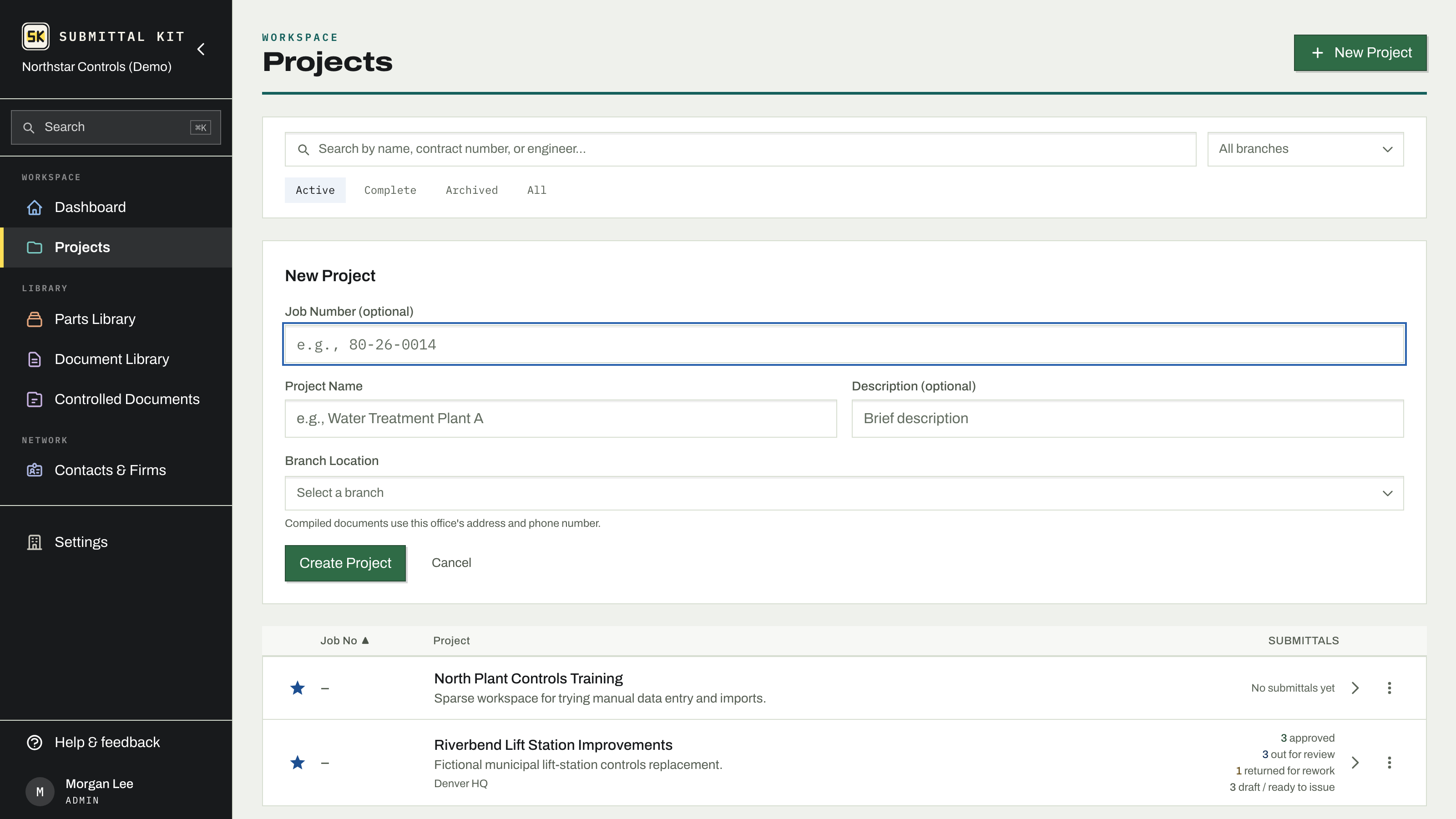
- Open Projects and click New Project.
- Enter the Job Number first (optional, e.g. 80-26-0014). It leads the form because it's how everyone will refer to the job; your most recent number is shown as a hint so the sequence stays consistent.
- Add the Project Name, an optional description, and click Create Project.
Not ready to commit a real job? On an empty project list, Build a sample project creates a worked example with equipment, submittals, and a schedule already in place, so you can explore before entering your own work.
Follow the projects you work
Every project row carries a star. Starring a project follows it, and your dashboard rolls up only the projects you follow, so a new member sees a project picker before anything else. Follow the jobs that are yours; skip the ones that aren't. Followers also receive schedule emails when a change moves the finish date meaningfully (see Project settings).
The project page
Open a project and the work lives in four tabs:
- Equipment. The register of everything you're furnishing. Start here, or import your BOM.
- Submittals. The packages you'll compile and issue from that register.
- Scope. What you provide on this job, filed against the spec section that asks for it.
- Specifications. The project spec, uploaded and readable in place.
Above the tabs, the Logs & lists band holds every record page for the job: Schedule, Submittal Log, RFI Log, Punch List, Change Orders, Contacts, Procurement, and Budget. Each shows a count of what it holds, so a glance tells you which records are live on this job.
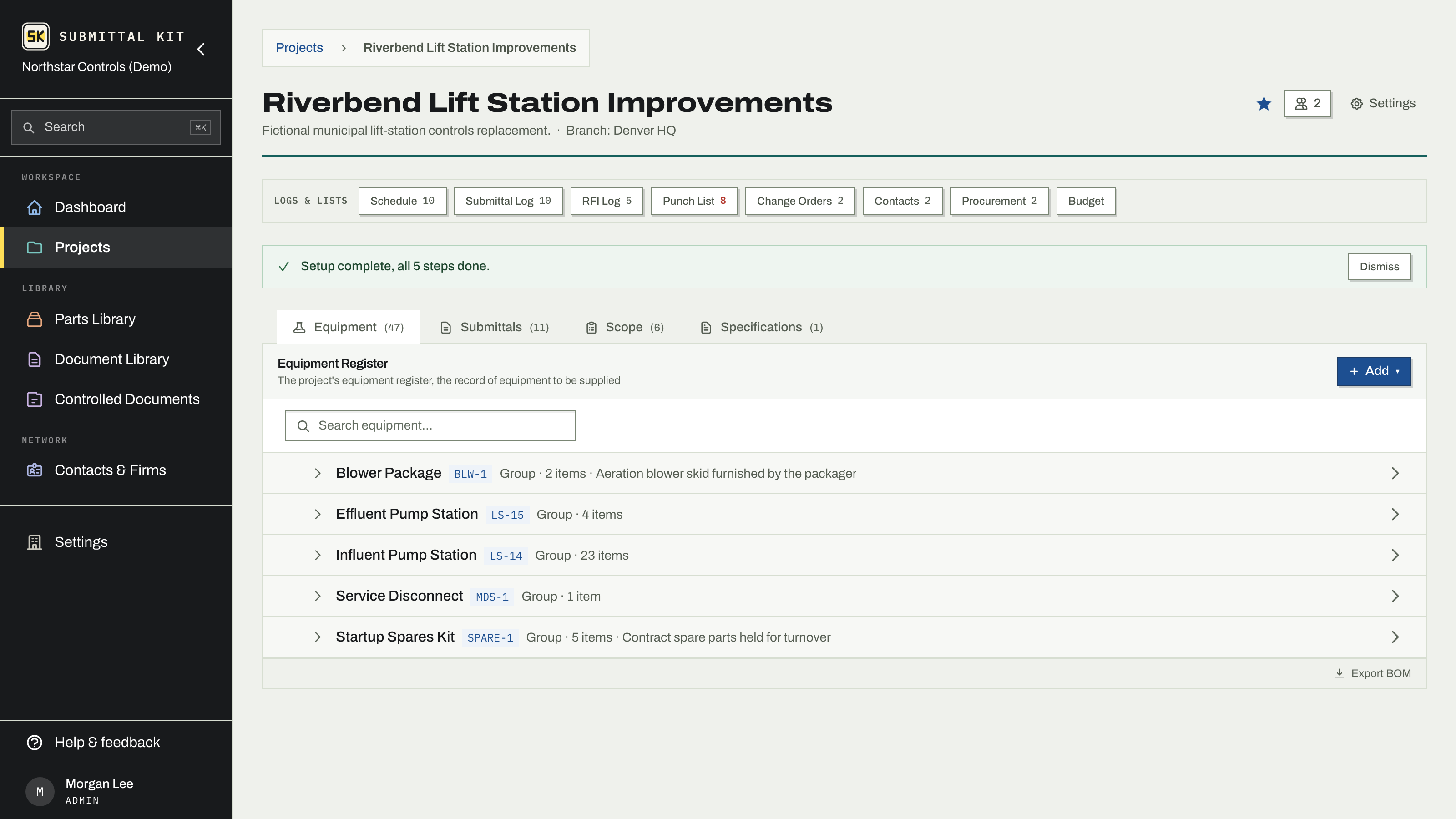
The register is the foundation everything else reads from. Ten minutes on the Equipment tab now pays back in every submittal, RFI, and O&M manual later.
When the register has entries, create your first submittal.
Updated Aug 15, 2026
Can't find it? [email protected]