All guides
Getting started
What is Submittal Kit Create Your Workspace Your First Project Search Everything The Dashboard Help and What's New Abbreviations We UnderstandProjects & Schedule
Project Settings Schedule and MilestonesEquipment Register
Equipment Register Basics Import a BOM Equipment DocumentsParts & Library
The Parts Library Part Documents Find Datasheets The Document Library Search Inside DocumentsSubmittals
Create a Submittal Configure Sections Choose Equipment Scope Compile a Submittal O&M Manuals Submittal Numbering Cover Pages Package LayoutsRevisions & Review
Issue a Revision Submittal Log Returned Reviews Comment Response Log Record an External Submittal Share with an outside reviewerRFIs
RFI Basics RFI Log RFI LayoutsField & QA
Punch Lists As-Built RedlinesSpecifications & Scope
Upload Specifications Spec CheckProcurement & Change Orders
Quotes and Purchase Orders Coverage and Lead Times Change Orders Budget and SOVDirectory & Team
Firms & Contacts Team & Access Personnel & CertificationsSettings & Billing
Company Identity Library Vocabulary Billing and PlansIntegrations
Connect an AgentHelp Revisions & Review
View as MarkdownSubmittal Log
The per-project record of what went out, what came back, and whose move it is.
The question that eats a Monday morning is not "what did we submit", it is "what are we still waiting on, and what is waiting on us". The Submittal Log answers both without opening a single file.
Read it at a glance
Each submittal is one row, numbered in the order it first entered the log, with its revisions stacked in a thread underneath. Expand a thread by clicking the register number or the revision count.
- Status chips carry the review outcome: Awaiting response, Approved, Approved as Noted, Revise & Resubmit, Rejected, No Exceptions Taken.
- Ball in court rides as a glyph beside every chip: a filled dot when the ball is in your court, an open dot while it is with the reviewer, a check when it is closed. A revise and resubmit can never hide among the closed rows.
- Dates and age: every row shows its submitted and returned dates, plus a running day count that turns red once the review is past its expected date, so overdue reviews surface themselves.
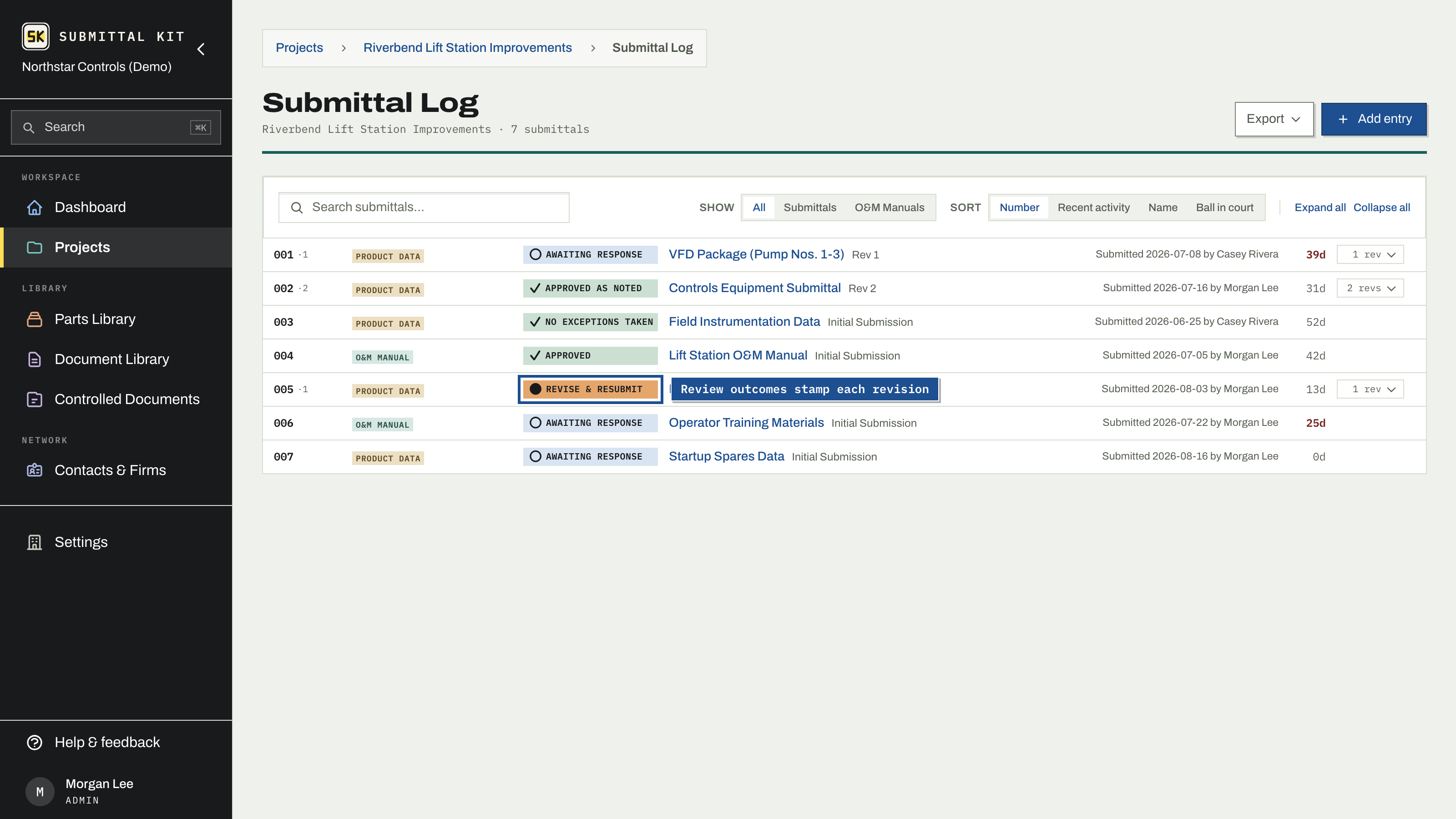
Search, the type filter (submittals vs O&M manuals), and four sorts (number, recent activity, name, ball in court) all live in the toolbar. Clicking a row opens its drawer, where you record what the reviewer sent back.
What your specification says you owe
When a claimed section names submittals you have not answered yet, the log shows how many and links to the Specifications tab. The decision is made there, beside the section text that demands it; see Answer what a section demands.
Recorded history
A submission that happened outside the app still belongs on the log. Rows marked Recorded hold a PDF that was assembled elsewhere; see Record an external submittal. Numbering stays continuous either way.
Hand over familiar paper
The Export menu produces the log as XLSX or PDF in the format reviewers and GCs expect, so you can keep the system of record here and still answer the "send me your submittal log" email in one click.
Sort by ball in court before a coordination meeting: everything you owe floats to the top, in urgency order.
Updated Sep 6, 2026
Can't find it? [email protected]