All guides
Getting started
What is Submittal Kit Create Your Workspace Your First Project Search Everything The Dashboard Help and What's New Abbreviations We UnderstandProjects & Schedule
Project Settings Schedule and MilestonesEquipment Register
Equipment Register Basics Import a BOM Equipment DocumentsParts & Library
The Parts Library Part Documents Find Datasheets The Document Library Search Inside DocumentsSubmittals
Create a Submittal Configure Sections Choose Equipment Scope Compile a Submittal O&M Manuals Submittal Numbering Cover Pages Package LayoutsRevisions & Review
Issue a Revision Submittal Log Returned Reviews Comment Response Log Record an External Submittal Share with an outside reviewerRFIs
RFI Basics RFI Log RFI LayoutsField & QA
Punch Lists As-Built RedlinesSpecifications & Scope
Upload Specifications Spec CheckProcurement & Change Orders
Quotes and Purchase Orders Coverage and Lead Times Change Orders Budget and SOVDirectory & Team
Firms & Contacts Team & Access Personnel & CertificationsSettings & Billing
Company Identity Library Vocabulary Billing and PlansIntegrations
Connect an AgentHelp RFIs
View as MarkdownRFI Layouts
Choose or build the page layout every issued RFI is generated on.
Reformatting a question into somebody's preferred RFI form is the least valuable ten minutes in the day. Set the layout once and every RFI you mark as sent comes out on it.
The layout in effect
Open Settings > RFI layout. The page opens with the layout currently in effect and why: your company default, or a customer-approved controlled form. When a controlled form default is set, it takes precedence over the ordinary default, and every issued RFI renders on that exact published revision. Either way, already-issued RFIs keep the layout and data they were issued with, always; changing the layout only changes RFIs issued from now on.
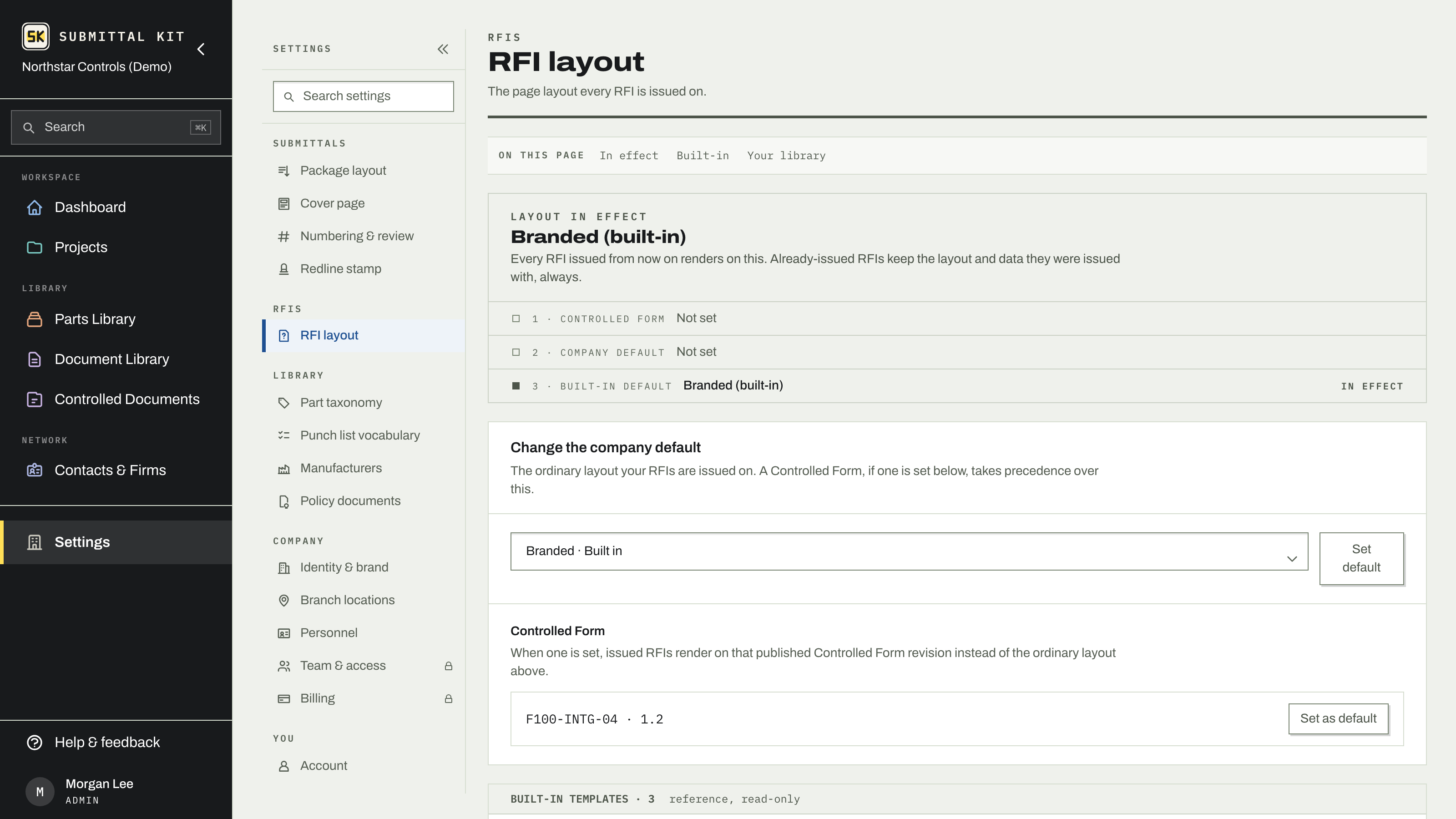
Admins can change the company default and set or clear the controlled form default; everyone can see which layout is in effect.
Built-ins and your library
Three built-in layouts cover the usual range, from a branded header with full request and response controls, to a detailed form with sign-off rows and a document-control footer, to a spare centered layout with the fewest fields. Built-ins are read-only: Clone one into your library to make it yours.
Library layouts open in the editor, where you rearrange fields and narrative sections and preview the result as you go. Long request and response sections continue onto extra pages automatically. You can edit, clone, archive, restore, and delete an unused layout, and set any one as the company default. The RFI editor shows only the fields your layout actually prints, so nobody fills in a box that never appears on paper.
Per-project override
A project can depart from the company default: in the project's settings, pick a specific layout for that project's RFIs, or leave it on Company default to follow whatever the company sets. Two exceptions keep the record honest:
- An RFI you upload from outside never uses a layout; that PDF is kept exactly as it came.
- Under a company controlled form there is no per-project picker, because every RFI on every project issues on the controlled document.
Cloning is cheap and issued RFIs are snapshots, so experiment freely: nothing you change in a layout can alter an RFI that already went out.
Updated Aug 15, 2026
Can't find it? [email protected]