All guides
Getting started
What is Submittal Kit Create Your Workspace Your First Project Search Everything The Dashboard Help and What's New Abbreviations We UnderstandProjects & Schedule
Project Settings Schedule and MilestonesEquipment Register
Equipment Register Basics Import a BOM Equipment DocumentsParts & Library
The Parts Library Part Documents Find Datasheets The Document Library Search Inside DocumentsSubmittals
Create a Submittal Configure Sections Choose Equipment Scope Compile a Submittal O&M Manuals Submittal Numbering Cover Pages Package LayoutsRevisions & Review
Issue a Revision Submittal Log Returned Reviews Comment Response Log Record an External Submittal Share with an outside reviewerRFIs
RFI Basics RFI Log RFI LayoutsField & QA
Punch Lists As-Built RedlinesSpecifications & Scope
Upload Specifications Spec CheckProcurement & Change Orders
Quotes and Purchase Orders Coverage and Lead Times Change Orders Budget and SOVDirectory & Team
Firms & Contacts Team & Access Personnel & CertificationsSettings & Billing
Company Identity Library Vocabulary Billing and PlansIntegrations
Connect an AgentHelp Settings & Billing
View as MarkdownLibrary Vocabulary
Keep categories, tags, punch terms, manufacturer names, and policy documents consistent across every project.
Vocabulary rots quietly: "Allen-Bradley", "Allen Bradley", and "AB" become three manufacturers, and "VFDs" and "Drives" become two categories that each hold half your drives. The Library group in Settings is where you keep one shared vocabulary that every project draws on.
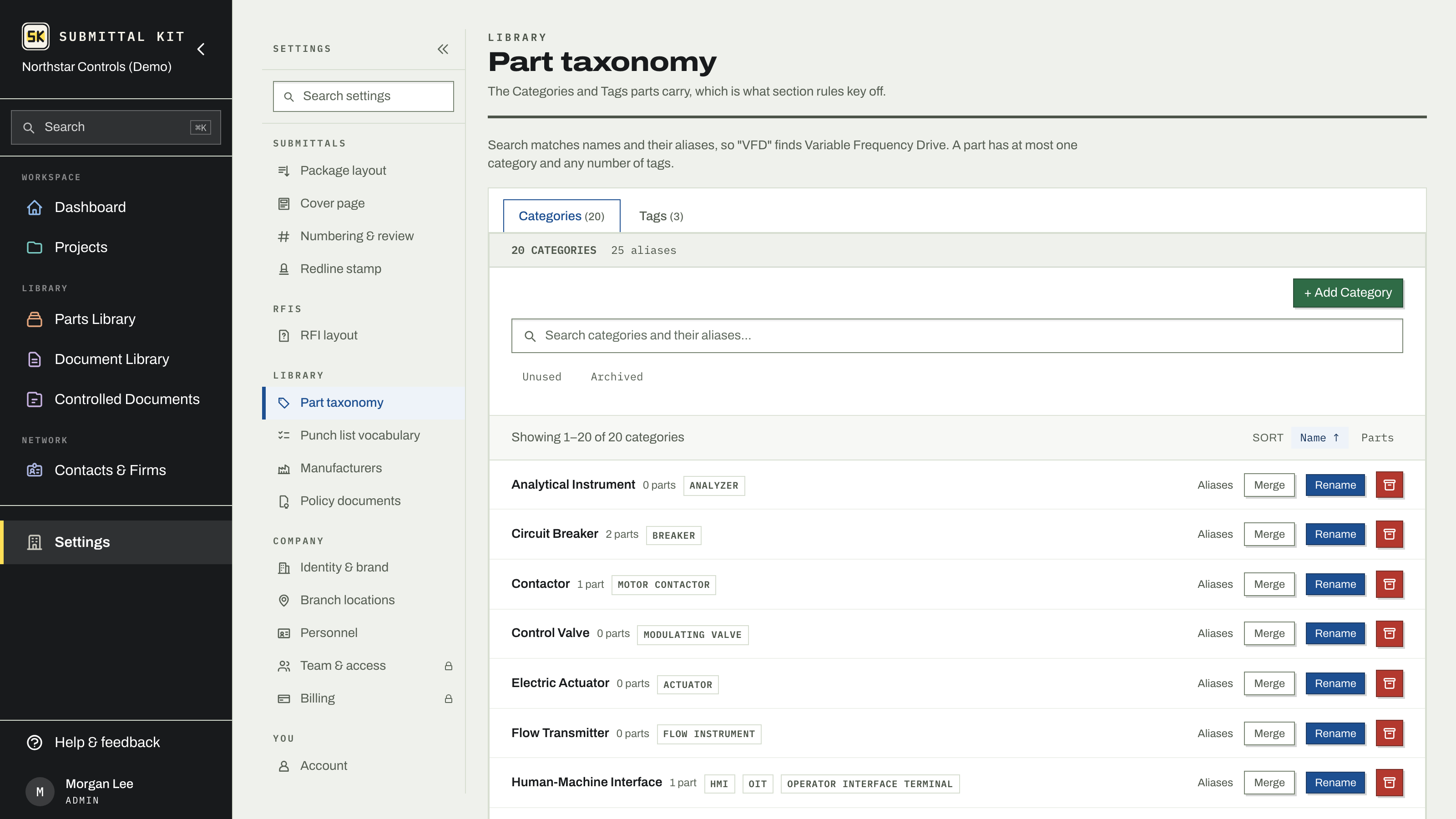
Part categories and tags
Categories and tags are what your part library speaks, and they matter beyond labeling: section routing rules key off categories, deciding where a part's documents land when you configure submittal sections.
- Aliases. Give a category or tag the other names people use for it. Search matches aliases too, so "VFD" finds Variable Frequency Drive.
- Merge. Fold a duplicate into the keeper. Its part assignments and aliases move over, and the old name becomes an alias, so nothing that pointed at it breaks.
- Archive. Retire a term you no longer use without disturbing the parts that carried it.
Punch list vocabulary
The Status, Severity, Category, and Source type lists every punch item speaks live here. Each Status carries an open, closed, or not-counted meaning, so your punch lists can count what's actually outstanding no matter what your team calls the states.
Manufacturers
Manufacturer profiles carry the alternate spellings that resolve to them, both on BOM import and in search. When duplicates slip in anyway, merge them the same way as categories: assignments move, the old spelling survives as an alias.
Company policy documents
Reusable PDFs, like your safety manual or insurance certificate, live under Policy documents. A submittal can pull any of them in as a Company Policy section, so the same current safety manual lands in every package that needs one, and updating the PDF once updates what every future compile includes.
Do the vocabulary cleanup once, before your next big import. Merging five manufacturer spellings takes two minutes in Settings; chasing them across forty parts later takes an afternoon.
Updated Aug 15, 2026
Can't find it? [email protected]