All guides
Getting started
What is Submittal Kit Create Your Workspace Your First Project Search Everything The Dashboard Help and What's New Abbreviations We UnderstandProjects & Schedule
Project Settings Schedule and MilestonesEquipment Register
Equipment Register Basics Import a BOM Equipment DocumentsParts & Library
The Parts Library Part Documents Find Datasheets The Document Library Search Inside DocumentsSubmittals
Create a Submittal Configure Sections Choose Equipment Scope Compile a Submittal O&M Manuals Submittal Numbering Cover Pages Package LayoutsRevisions & Review
Issue a Revision Submittal Log Returned Reviews Comment Response Log Record an External Submittal Share with an outside reviewerRFIs
RFI Basics RFI Log RFI LayoutsField & QA
Punch Lists As-Built RedlinesSpecifications & Scope
Upload Specifications Spec CheckProcurement & Change Orders
Quotes and Purchase Orders Coverage and Lead Times Change Orders Budget and SOVDirectory & Team
Firms & Contacts Team & Access Personnel & CertificationsSettings & Billing
Company Identity Library Vocabulary Billing and PlansIntegrations
Connect an AgentHelp RFIs
View as MarkdownRFI Log
The per-project numbered log of every RFI, with whose move it is and what is overdue.
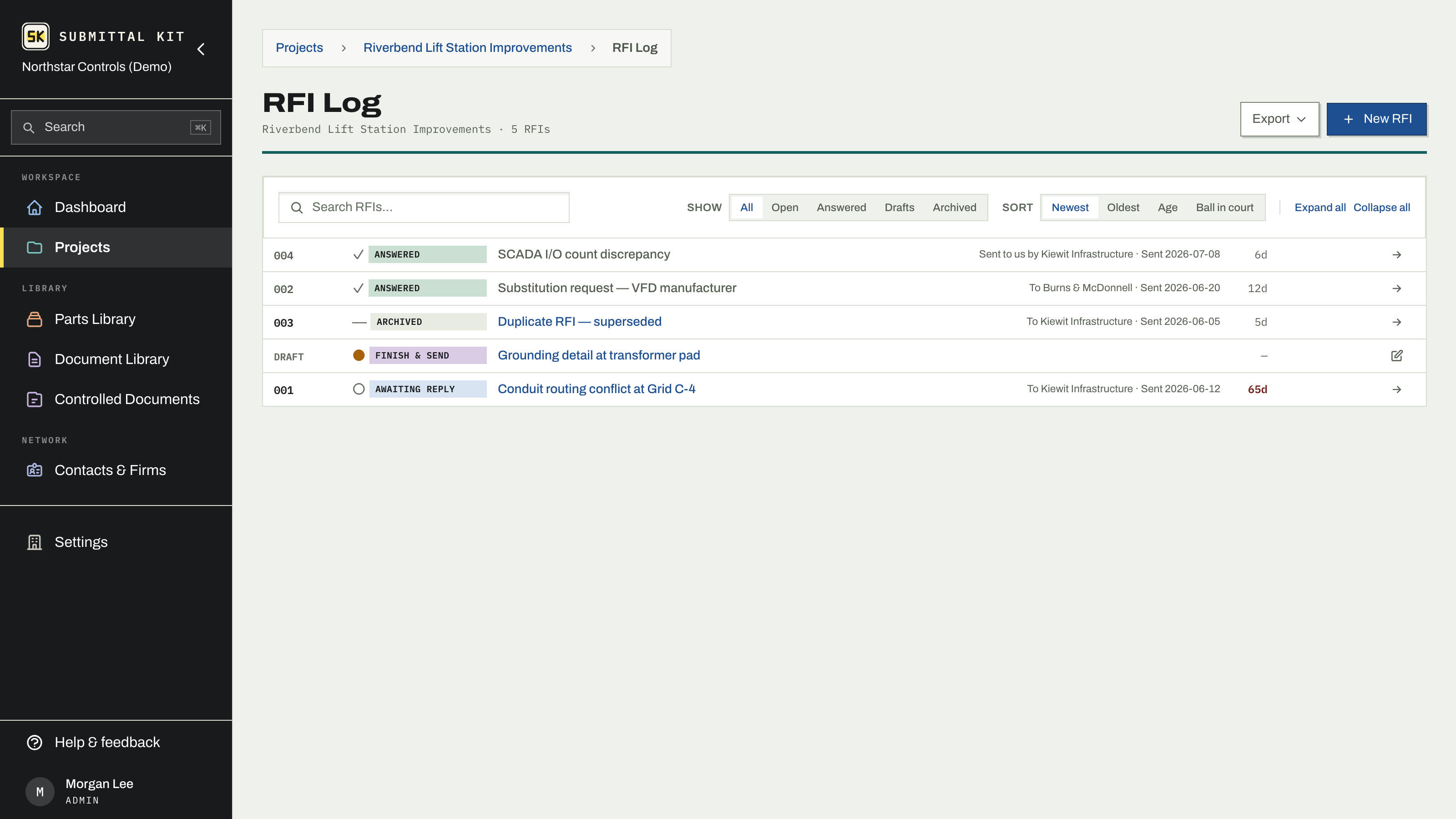
"Did they ever answer RFI 14?" should not require scrolling an inbox. The RFI Log keeps every question on a numbered row with its status, its age, and whose court the ball is in.
One row per thread
Each RFI is a single compact row; follow-ups collapse into a thread under the original, and the collapsed parent always wears the most urgent member's chip, so an open follow-up can never hide behind an answered original. Every chip carries a ball-in-court glyph: a filled dot when the answer is owed to you to chase down, an open dot while you await a reply, a check when it is done. Fully settled threads mute to gray.
The age column counts days since the RFI was sent and flags a row overdue once it passes its response-expected date. Filter by status (open, answered, drafts, archived), sort by newest, oldest, age, or ball in court, and search across the whole log. Clicking a row opens a drawer with the question and answer in place.
Log an RFI that already went out
An RFI sent by email before the project moved here still belongs on the log. Start a new RFI and choose One that exists, then drop the PDF that went out. It lands on the log with the next number, the PDF is kept exactly as it came as the RFI's original, and a reading of it lifts the subject, question, recipient, and date onto the record for you to correct. If the PDF never stated a sent date, the record asks for one on arrival, because the age and overdue math count from it. Nothing else is renumbered.
Numbers and dates
- Their RFI number. The GC runs their own log? Keep their number (say, GC-RFI-0087) on the record. It shows in your log and is never printed on your document.
- Renumber. Line your number up with someone else's log any time; a follow-up's sub-number moves with its original automatically.
- Response expected by. Filled from your company's default turnaround when the RFI is sent, and editable per RFI. This date drives the overdue flag.
- Sent date. Correctable after the fact; the response-expected date moves with it.
Export
The Export menu produces the log as XLSX or PDF, so the weekly "send your RFI log" request is one click. See RFI basics for writing and answering, and RFI layouts for the document itself.
Updated Aug 15, 2026
Can't find it? [email protected]