All guides
Getting started
What is Submittal Kit Create Your Workspace Your First Project Search Everything The Dashboard Help and What's New Abbreviations We UnderstandProjects & Schedule
Project Settings Schedule and MilestonesEquipment Register
Equipment Register Basics Import a BOM Equipment DocumentsParts & Library
The Parts Library Part Documents Find Datasheets The Document Library Search Inside DocumentsSubmittals
Create a Submittal Configure Sections Choose Equipment Scope Compile a Submittal O&M Manuals Submittal Numbering Cover Pages Package LayoutsRevisions & Review
Issue a Revision Submittal Log Returned Reviews Comment Response Log Record an External Submittal Share with an outside reviewerRFIs
RFI Basics RFI Log RFI LayoutsField & QA
Punch Lists As-Built RedlinesSpecifications & Scope
Upload Specifications Spec CheckProcurement & Change Orders
Quotes and Purchase Orders Coverage and Lead Times Change Orders Budget and SOVDirectory & Team
Firms & Contacts Team & Access Personnel & CertificationsSettings & Billing
Company Identity Library Vocabulary Billing and PlansIntegrations
Connect an AgentHelp Equipment Register
View as MarkdownImport a BOM
Drop a spreadsheet on the register, review exactly what will change, then commit.
Retyping a 400-row BOM into any system is an afternoon gone and a typo waiting for a reviewer to find. Import the spreadsheet instead: the register reads it, shows you exactly what will change, and touches nothing until you say so.
Drop the file
In the Equipment tab, open Add and choose Import BOM. Drop a CSV or Excel file and pick where it lands: the project root or any group. Importing runs in the background; a banner keeps your place, and you can Continue, Stop, or Discard at any time. Stopping imports nothing and leaves your register unchanged.
The importer reads your workbook
Most files skip straight to review. The importer looks at every sheet and reads the rows underneath each heading before deciding, so a leftovers tab loses to the live parts table, and a column that simply counts 1, 2, 3 is never taken for a part number. Headings are matched by whole words: "Manufacture", "Part #", and "PartNumber" are all understood, and a column like "Finished Water QMS" is never mistaken for a quantity.
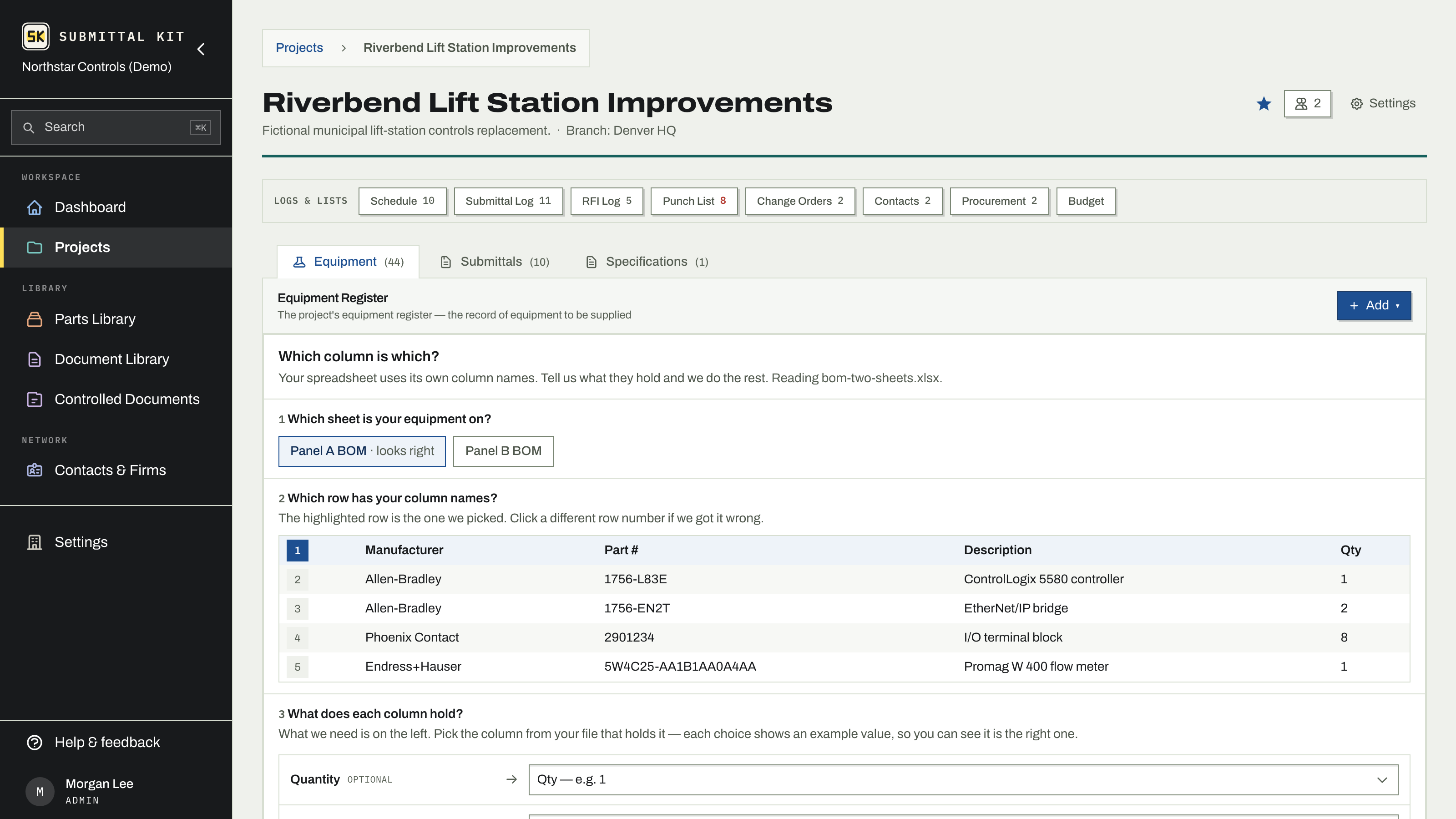
When the file is ambiguous, a short mapping screen asks in order: which sheet your equipment is on (the best guess is marked "looks right"), which row has your column names, and what each column holds. Rows a part is already filed under in your Parts Library match the part you have, and a manufacturer spelling the library already knows links on its own.
Review, then import
Nothing has changed yet at this screen. Choose how the file applies:
- Replace, start fresh. The target location becomes exactly this list. The screen states how many existing entries would be deleted, and calls out any that carry uploaded files or configuration strings.
- Sync, add and update only. Adds what is new, updates what changed, never deletes. You see the counts up front: added, updated, untouched, and removed (rows with quantity 0 remove the matching entry).
Expand the row list if you want the full receipt, use Back to columns to fix a mapping, Start over to discard, or commit with the import button. A pending import expires on its own if you walk away.
Manufacturers the file spells differently
Each manufacturer name in the file is checked against your manufacturer profiles and the other names they have learned. Names that match link on their own; the rest are listed on the review screen. For each one, choose Add as a new manufacturer or Use one I already have and pick the profile. A name that looks like one you have arrives pre-filled, with "(suggested)" on the choice, so you can tell a pre-filled answer from one you picked. Leaving Remember as another name for it checked stores the spelling as a company-wide alias, so the next import links it without a review. Aliases live under Settings, Library, Manufacturers; see Library vocabulary.
Round trips and exports
Export BOM at the bottom of the register downloads the whole tree as XLSX; every group's page has the same export for just that group, titled with its name and with its own items under its own heading. A submittal's equipment list has an Export BOM too, for exactly the equipment that submittal includes. Your own export imports cleanly into another project, so a proven register can seed the next job.
Re-import the vendor's updated BOM with Sync to fold in revisions without disturbing entries the file doesn't mention.
Next: attach equipment documents to the imported entries, then create a submittal that covers them.
Updated Sep 6, 2026
Can't find it? [email protected]