All guides
Getting started
What is Submittal Kit Create Your Workspace Your First Project Search Everything The Dashboard Help and What's New Abbreviations We UnderstandProjects & Schedule
Project Settings Schedule and MilestonesEquipment Register
Equipment Register Basics Import a BOM Equipment DocumentsParts & Library
The Parts Library Part Documents Find Datasheets The Document Library Search Inside DocumentsSubmittals
Create a Submittal Configure Sections Choose Equipment Scope Compile a Submittal O&M Manuals Submittal Numbering Cover Pages Package LayoutsRevisions & Review
Issue a Revision Submittal Log Returned Reviews Comment Response Log Record an External Submittal Share with an outside reviewerRFIs
RFI Basics RFI Log RFI LayoutsField & QA
Punch Lists As-Built RedlinesSpecifications & Scope
Upload Specifications Spec CheckProcurement & Change Orders
Quotes and Purchase Orders Coverage and Lead Times Change Orders Budget and SOVDirectory & Team
Firms & Contacts Team & Access Personnel & CertificationsSettings & Billing
Company Identity Library Vocabulary Billing and PlansIntegrations
Connect an AgentHelp Procurement & Change Orders
View as MarkdownBudget and SOV
Track job cost in the Budget Register and billing in the SOV Tracker, on one page that agrees with itself.
Cost lives in one spreadsheet, billing in another, and the month you're underbilled is the month nobody compares them. The Budget tab keeps both on one page, fed by the same purchase orders and change orders.
The contract at a glance
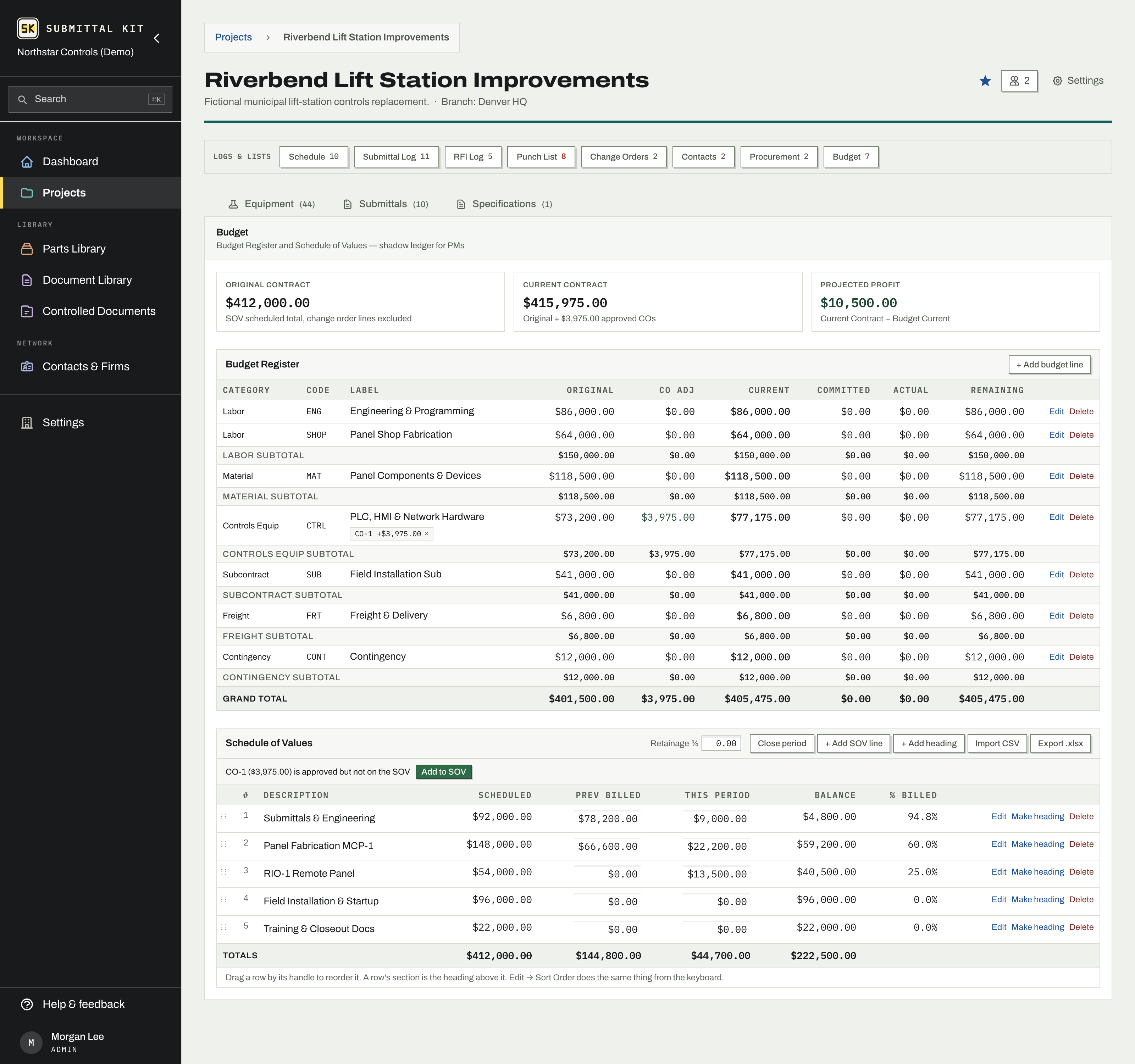
The top of the tab shows Original Contract (your SOV scheduled total), Current Contract (original plus approved COs), and Projected Profit (current contract minus current budget). No hunting, no reconciling.
Budget Register
Budget lines carry a category (Labor, Material, Controls Equip, Subcontract, Freight, and more), a code, and a label. Each line shows Original, CO Adj, Current, Committed, Actual, and Remaining, with subtotals per category. Committed fills in automatically as purchase order lines are tied to budget lines, so the register reads what you've actually spent against, not what you hoped.
Starting from an SOV you already have? Seed the register from it: one budget line per SOV line, at its scheduled value, ready to recategorize.
Approved change orders allocate onto budget lines, and the page warns when approved CO value sits unallocated or over-allocated, so cost stays consistent with the log.
SOV Tracker
The Schedule of Values holds your billing lines and the headings that group them (headings carry no money and stay out of totals). Reorder rows by dragging, import the whole thing from a CSV or Excel file, or read it from a PDF. Previously Billed and This Period edit inline, right in the table, and save as you leave each cell.
- Bill the month by filling This Period across the lines you're billing.
- Set your retainage percent; the tracker shows total billed, retainage held, and billed less retainage.
- Close the billing period. This Period rolls into Previously Billed, and the closed period is kept in billing history, line by line.
- Export to XLSX whenever the GC wants familiar paper.
An approved CO that isn't on the SOV gets a one-click nudge to add it, so approved work never goes unbilled by omission.
Read a PDF into the SOV
Read a PDF above the table takes a G702/G703 continuation sheet, a contract price breakdown exhibit, or any PDF that lists cost lines with amounts. The read runs in the background, and Stop cancels it. The proposed lines then appear in a review table above the SOV, and nothing is added until you say so: uncheck rows you don't want, edit a description or amount in place, and heading rows come through so the document's grouping survives. Rows marked Check this amount against the document arrive unchecked when no amount could be read; type the amount to include them. The Kept lines total is compared against the total the document states, so a missed or doubled line shows before you commit. Add kept lines appends them after any lines already there, in document order. Dismiss discards the proposal and the upload.
The underbilled warning compares percent of contract billed against percent of budget committed. When billing falls behind cost, the page says so, with a dollar estimate, before the bank does.
Updated Sep 6, 2026
Can't find it? [email protected]