All guides
Getting started
What is Submittal Kit Create Your Workspace Your First Project Search Everything The Dashboard Help and What's New Abbreviations We UnderstandProjects & Schedule
Project Settings Schedule and MilestonesEquipment Register
Equipment Register Basics Import a BOM Equipment DocumentsParts & Library
The Parts Library Part Documents Find Datasheets The Document Library Search Inside DocumentsSubmittals
Create a Submittal Configure Sections Choose Equipment Scope Compile a Submittal O&M Manuals Submittal Numbering Cover Pages Package LayoutsRevisions & Review
Issue a Revision Submittal Log Returned Reviews Comment Response Log Record an External Submittal Share with an outside reviewerRFIs
RFI Basics RFI Log RFI LayoutsField & QA
Punch Lists As-Built RedlinesSpecifications & Scope
Upload Specifications Spec CheckProcurement & Change Orders
Quotes and Purchase Orders Coverage and Lead Times Change Orders Budget and SOVDirectory & Team
Firms & Contacts Team & Access Personnel & CertificationsSettings & Billing
Company Identity Library Vocabulary Billing and PlansIntegrations
Connect an AgentHelp Field & QA
View as MarkdownAs-Built Redlines
Mark up drawings as editable data and issue the redline set like any other submittal.
As-builts usually mean ink on a scan: once the markups are flattened into a PDF, fixing one callout means redoing the sheet. In Submittal Kit a redline stays editable data on top of the source drawings until the moment you build the output.
Create a redline
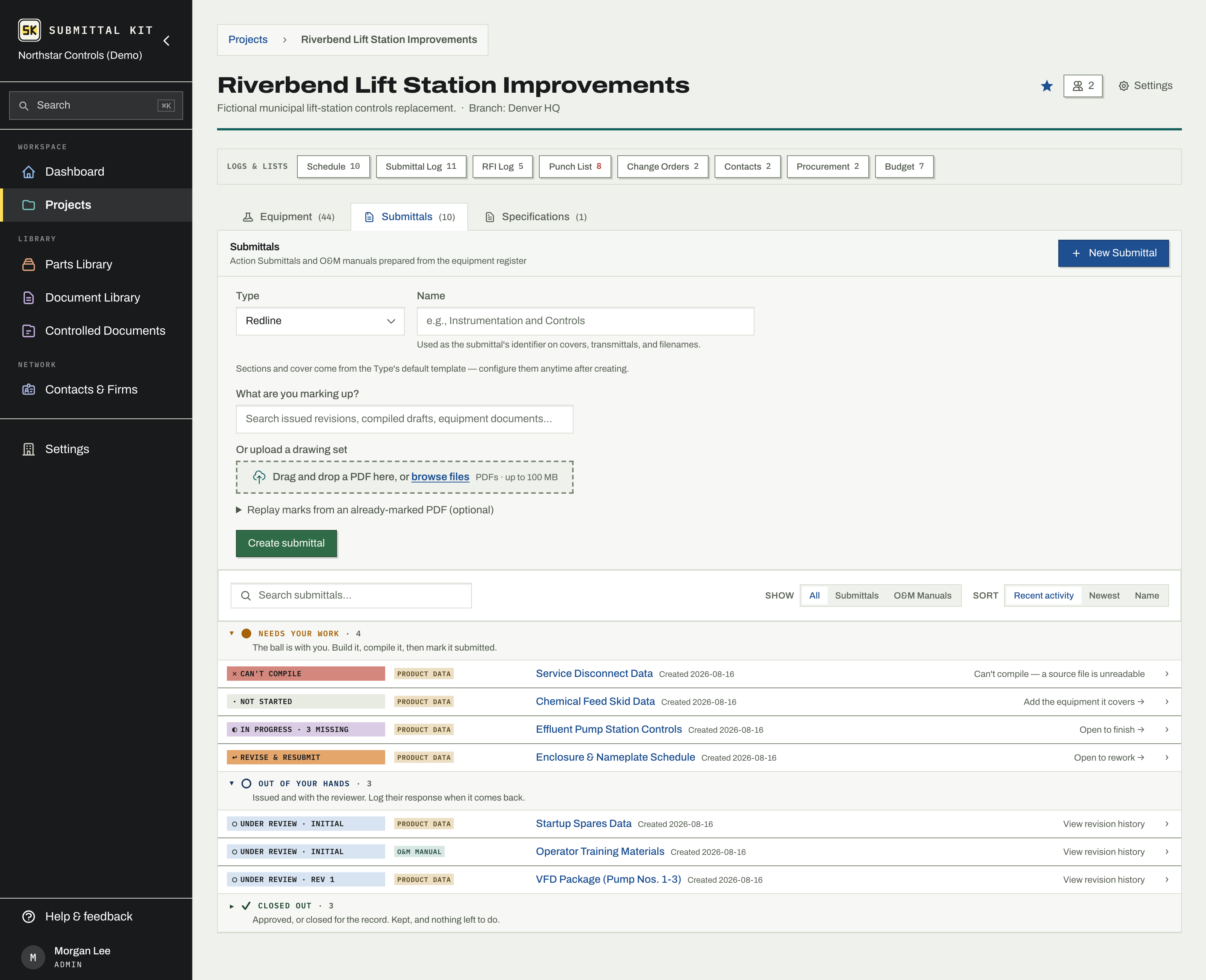
A redline is a submittal type, so it starts on the project's Submittals tab:
- Choose New Submittal and pick your redline type.
- Pick what you are marking up: search issued revisions, compiled drafts, and equipment documents, or upload a drawing set.
- Optionally drop in an already-marked PDF. Its marks replay onto your set, fully editable, so a hand-marked field set becomes a starting point instead of a retype.
- Create the submittal, then open the markup editor from its page.
Mark it up
The editor uses the same shape tools as datasheet highlighting: highlights, boxes, text, lines, arrows, clouds, and stamps. Every mark is a live object you can move, restyle, or delete later.
When marks were replayed from a donor PDF, the app flags marks that look like the donor set's old review stamp (a repeated name and date on every page) in a banner. Show jumps to one, Remove all clears them in one action, Keep them dismisses the flag. Your old stamp never rides silently into the new issue.
The Stamp tool presses your company redline stamp onto every page, carrying your name and the date. Admins can set up the stamp under Settings, Redline stamp; your name comes from your Account page.
Build and issue
Press Build PDF to bake the current marks into the output set. If you edit after building, the editor tells you the output is out of date so a stale file never goes out. Download the built set, or issue it through the normal submittal flow with a cover, a number, and a permanent issued record, exactly like any other package. See Issue a revision and Compile a submittal.
Because marks stay data, the next revision of the as-built starts from the previous one. Rebuild after each round of field changes instead of re-marking a fresh scan. Field deficiencies belong on the Punch List instead.
Updated Aug 15, 2026
Can't find it? [email protected]