All guides
Getting started
What is Submittal Kit Create Your Workspace Your First Project Search Everything The Dashboard Help and What's New Abbreviations We UnderstandProjects & Schedule
Project Settings Schedule and MilestonesEquipment Register
Equipment Register Basics Import a BOM Equipment DocumentsParts & Library
The Parts Library Part Documents Find Datasheets The Document Library Search Inside DocumentsSubmittals
Create a Submittal Configure Sections Choose Equipment Scope Compile a Submittal O&M Manuals Submittal Numbering Cover Pages Package LayoutsRevisions & Review
Issue a Revision Submittal Log Returned Reviews Comment Response Log Record an External Submittal Share with an outside reviewerRFIs
RFI Basics RFI Log RFI LayoutsField & QA
Punch Lists As-Built RedlinesSpecifications & Scope
Upload Specifications Spec CheckProcurement & Change Orders
Quotes and Purchase Orders Coverage and Lead Times Change Orders Budget and SOVDirectory & Team
Firms & Contacts Team & Access Personnel & CertificationsSettings & Billing
Company Identity Library Vocabulary Billing and PlansIntegrations
Connect an AgentHelp Revisions & Review
View as MarkdownReturned Reviews
Attach what the reviewer sent back, get the outcome read for you, and see what each revision changed.
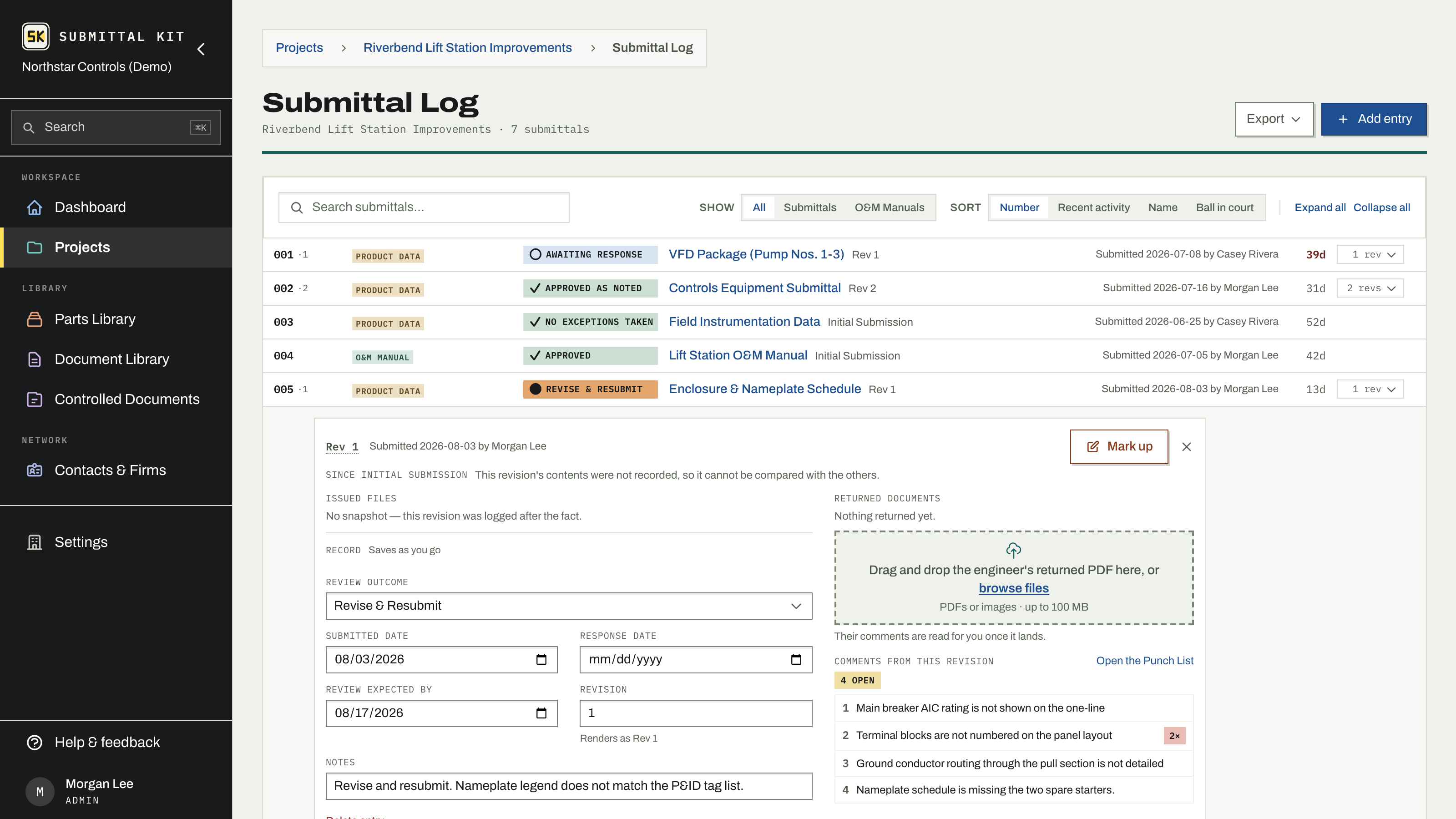
The reviewer's stamped PDF lands in your inbox, and now three chores start: file it somewhere findable, update the log, and figure out what the comments mean for the next round. The review record does all three in one place, and it lives in two: the revision drawer on the Submittal Log, and the Revisions and reviews list on the submittal page, where each row shows what was sent on the left and how it came back on the right.
Attach what came back
Open the revision, from its row on the submittal page or from its drawer on the Submittal Log, and drop the returned PDF under Returned documents. If the reviewer sends a corrected copy later, Upload correction adds it as a new version; every prior version is retained as part of the permanent record, and a detected digital signature is flagged so you know to validate the original.
The outcome, read for you
Once the returned document lands, a reading of it summarizes the response on a single line: the outcome stamp, the reviewer, the return date, and a chip for any pages it could not cover, so you know whether the response still needs your eyes. A progress strip shows the reading working, and Stop hands it back to you at any point; the file stays attached either way.
What was read expands the evidence: the stamp text, matched spec references, and the quoted lines behind each field. Nothing is recorded until you save. When the reading finds a clear stamp, the drawer offers it (Use it) so recording a revise and resubmit is one click, and the record strip below (outcome, dates, notes) saves as you go. Reviewer comments found in the document flow to your punch list for tracking, and you answer them on the submittal page in the Comment Response Log.
Responses from the share link
A reviewer who got the package through Share answers on the page it opens, and their response waits in this drawer with their name, outcome, comments and the PDF they attached. Accept files the PDF as a returned document, adds a PDF of the spots they marked, and sends each marked comment to the candidate review already tied to its section and equipment. Use it records the outcome they stated without filing anything. Dismiss sets the response aside. View marked spots shows their marks on the issued PDF before you decide.
What this revision changed
The Since line at the top of the drawer states what the revision added, replaced, or removed compared to the one before it, with the full list one click away under Show changes: documents by name and role, sections added, removed, or retitled. Page numbers move on every recompile and are deliberately not counted as changes. When a reviewer asks "what's different in Rev 2", the answer is already written.
Download the record
Everything the drawer shows is downloadable:
- the exact issued snapshot, byte for byte what was transmitted
- the complete package (the primary PDF, every untouched signed original, and a README)
- individual issued artifacts, and every version of every returned document
Attach the returned document even when the outcome is a simple approval. The log's overdue math, the ball-in-court glyphs, and the next round's revision all read from what is on the record.
Updated Sep 18, 2026
Can't find it? [email protected]