All guides
Getting started
What is Submittal Kit Create Your Workspace Your First Project Search Everything The Dashboard Help and What's New Abbreviations We UnderstandProjects & Schedule
Project Settings Schedule and MilestonesEquipment Register
Equipment Register Basics Import a BOM Equipment DocumentsParts & Library
The Parts Library Part Documents Find Datasheets The Document Library Search Inside DocumentsSubmittals
Create a Submittal Configure Sections Choose Equipment Scope Compile a Submittal O&M Manuals Submittal Numbering Cover Pages Package LayoutsRevisions & Review
Issue a Revision Submittal Log Returned Reviews Comment Response Log Record an External Submittal Share with an outside reviewerRFIs
RFI Basics RFI Log RFI LayoutsField & QA
Punch Lists As-Built RedlinesSpecifications & Scope
Upload Specifications Spec CheckProcurement & Change Orders
Quotes and Purchase Orders Coverage and Lead Times Change Orders Budget and SOVDirectory & Team
Firms & Contacts Team & Access Personnel & CertificationsSettings & Billing
Company Identity Library Vocabulary Billing and PlansIntegrations
Connect an AgentHelp Field & QA
View as MarkdownPunch Lists
Keep one numbered punch log per project and issue it as a clean controlled round instead of a spreadsheet.
Punch lists usually live in a spreadsheet that gets emailed around until nobody knows which copy is current, and the version the owner sees is a screenshot. Submittal Kit keeps one numbered log per project, and every handoff comes out of it.
One log, numbered per panel
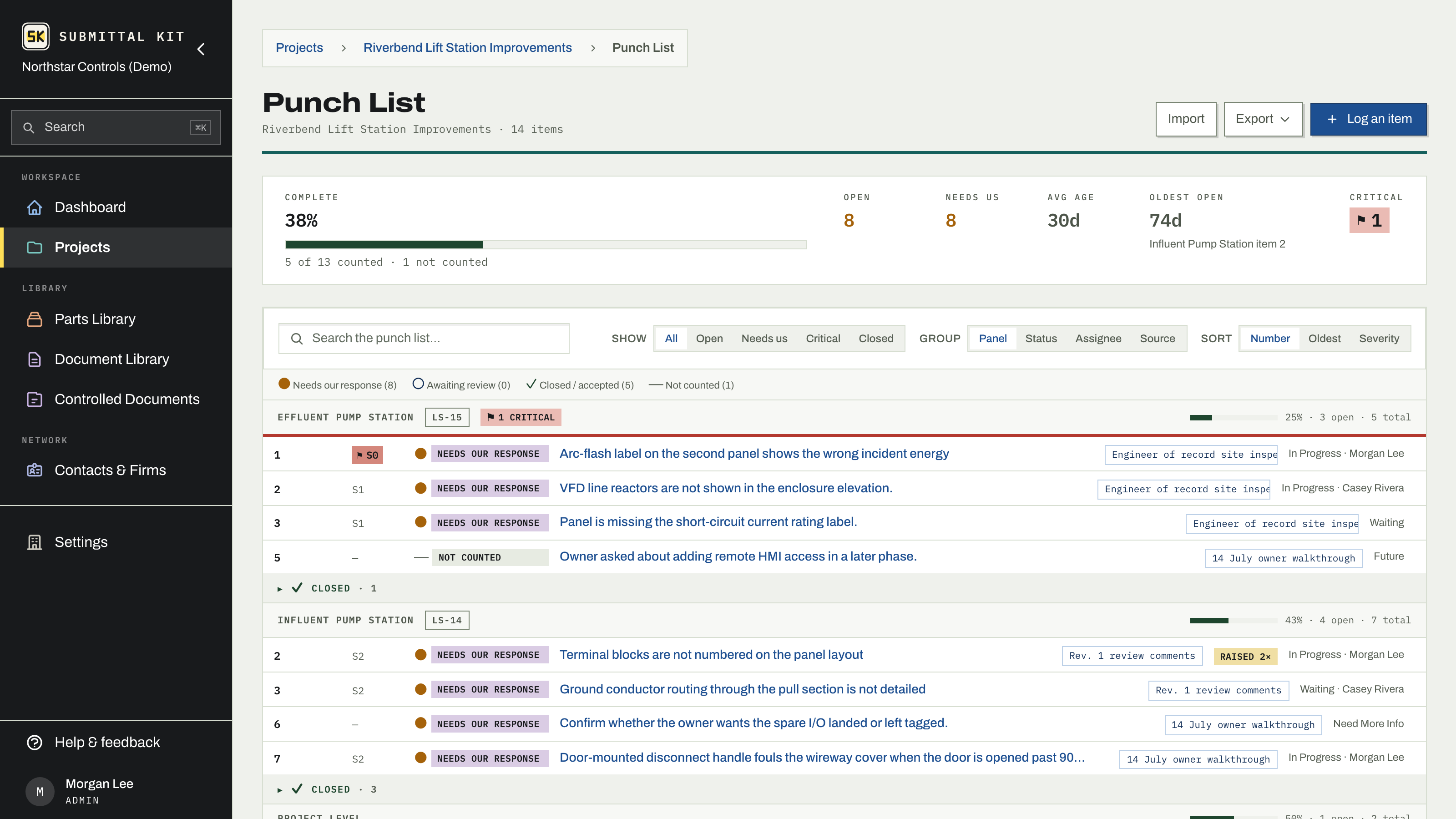
Every item lives on the project's Punch List. Numbers run per panel and never change; deleting an item retires its number, so an item quoted in an email a year ago still resolves. Items attach to a source (a site visit, a review, or a returned submittal review), so the log always answers "where did this come from."
Click a row to open the item's drawer: status, severity, category, and source (all drawn from your company's own vocabulary, editable under Settings, Punch list vocabulary), the comment in their words, your response, and references to RFIs and revisions. When a reviewer brings a closed item back, press They raised it again to start a new round; earlier rounds stay as read-only history. Acceptance can be set by hand when there is no returned document to read it from.
Logging a batch is built for transcription: panel, category, severity, and source stay set between items, so a dozen comments cost twelve pastes, not twelve forms.
Bring in an existing list
Already tracking punch in a spreadsheet? Choose Import on the Punch List:
- Upload the file. Known layouts are recognized automatically; anything else gets a simple column mapper.
- Confirm which panel the items belong to, since numbering runs per panel.
- Commit. Matched item numbers are updated, new ones are added, and nothing already in the register is ever removed by an import.
When a marked-up document comes back, drop it in instead of retyping it: candidates read from the document land in a review queue where you keep, discard, split, or merge each one, and confirm when one is a known item raised again. Nothing becomes an item until you accept it, progress is visible while the file is being read, and Stop ends the run at any time.
Issue it For Record
When it is time to hand the list over (substantial completion, FAT acceptance, final acceptance), open Punch List for Record. A record freezes every item in scope, with counts and percent complete, exactly as they stand that day, and exports per record to XLSX. The full log exports to XLSX too, so a GC who wants the familiar spreadsheet still gets one, generated from the system of record.
Comments that arrive on a returned submittal review flow into this same log automatically. See Returned reviews and the Submittal Log.
Updated Aug 15, 2026
Can't find it? [email protected]