All guides
Getting started
What is Submittal Kit Create Your Workspace Your First Project Search Everything The Dashboard Help and What's New Abbreviations We UnderstandProjects & Schedule
Project Settings Schedule and MilestonesEquipment Register
Equipment Register Basics Import a BOM Equipment DocumentsParts & Library
The Parts Library Part Documents Find Datasheets The Document Library Search Inside DocumentsSubmittals
Create a Submittal Configure Sections Choose Equipment Scope Compile a Submittal O&M Manuals Submittal Numbering Cover Pages Package LayoutsRevisions & Review
Issue a Revision Submittal Log Returned Reviews Comment Response Log Record an External Submittal Share with an outside reviewerRFIs
RFI Basics RFI Log RFI LayoutsField & QA
Punch Lists As-Built RedlinesSpecifications & Scope
Upload Specifications Spec CheckProcurement & Change Orders
Quotes and Purchase Orders Coverage and Lead Times Change Orders Budget and SOVDirectory & Team
Firms & Contacts Team & Access Personnel & CertificationsSettings & Billing
Company Identity Library Vocabulary Billing and PlansIntegrations
Connect an AgentHelp Revisions & Review
View as MarkdownRecord an External Submittal
Put a submittal you sent outside the app on the log, with its PDF, dates, and outcome.
Some packages predate the project's move here, and some go out by hand in a hurry. Either way, a log with holes in it is a log nobody trusts. Recording puts the real PDF on the record so the history is complete.
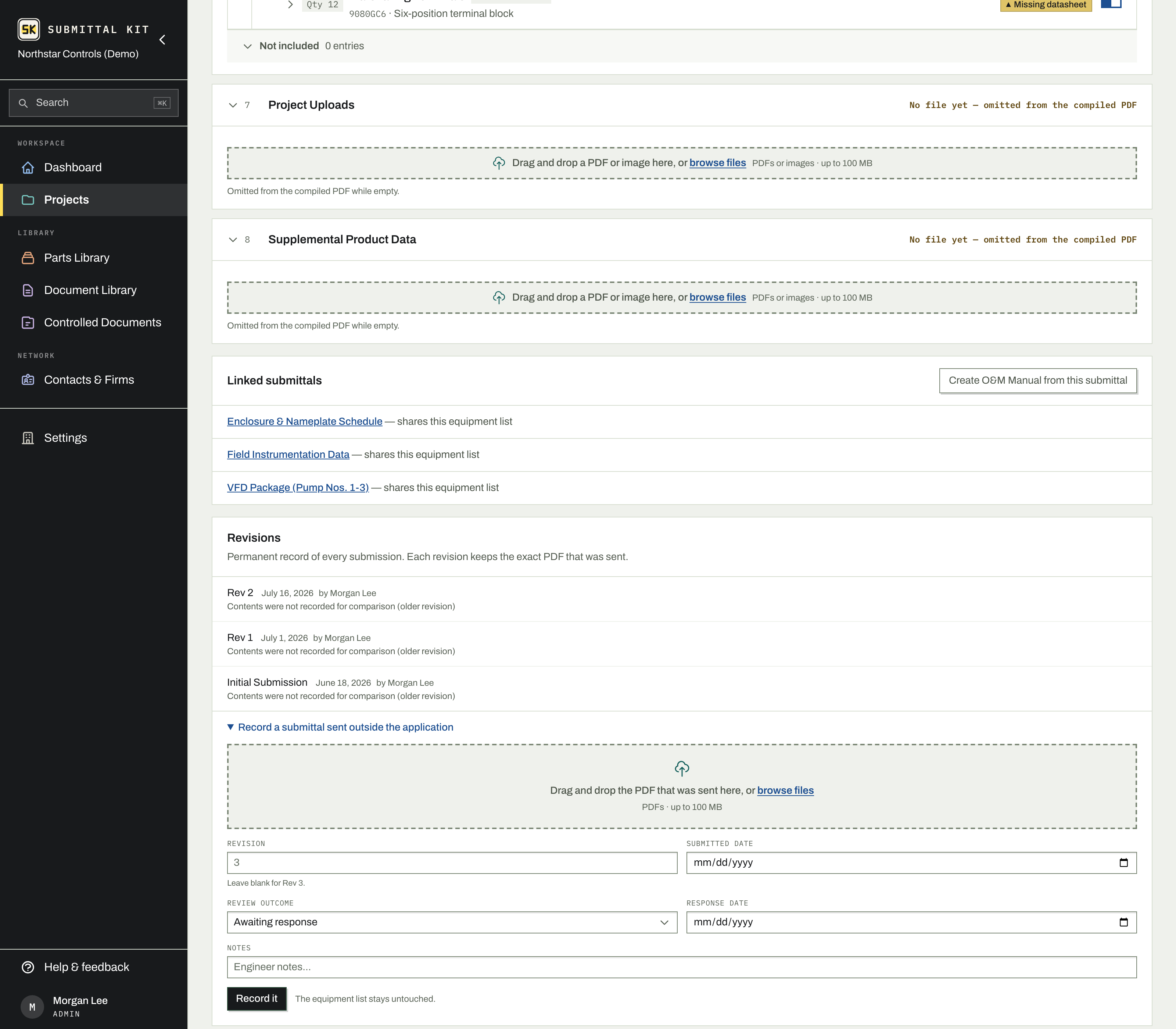
Record it
- Open the submittal and find its Revisions section. With nothing submitted yet, the recording form is right there; otherwise expand Record a submittal sent outside the application.
- Drop the PDF that was actually sent.
- Enter the revision number, or leave it blank to take the next one in sequence.
- Fill in the submitted date, and, if the review already came back, the review outcome and response date.
- Click Record it.
The revision appears on the Submittal Log like any other, marked Recorded so it reads apart from a package the app compiled. Your equipment list is untouched, and the next revision you issue from the app simply continues the numbering.
Fix a mistake
A recorded revision is typed in after the fact, so the usual error is the wrong file or the wrong date, not a bad build. Until the reviewer's returned document is attached, you can correct all of it:
- Replace the PDF from the revision's row, without re-entering anything around it.
- Change the number or the dates in the revision's drawer on the log, where the record strip saves as you go.
- Delete it entirely, even when it is not the newest revision.
Once a returned document is attached, the revision joins the permanent record like any other and corrections close. That is the point of the log: what the reviewer responded to can never quietly change underneath their response.
What a recorded revision doesn't have
Because the package was assembled elsewhere, there is no issued snapshot of individual artifacts and no recorded contents to diff against neighboring revisions; the drawer says so instead of guessing. Everything else works normally: returned documents, the outcome reading, and comment tracking treat a recorded revision exactly like a compiled one.
Bringing a project in mid-stream? Record the old revisions first, oldest to newest, then build the next round in the app. The thread reads as one continuous history.
Updated Aug 15, 2026
Can't find it? [email protected]