All guides
Getting started
What is Submittal Kit Create Your Workspace Your First Project Search Everything The Dashboard Help and What's New Abbreviations We UnderstandProjects & Schedule
Project Settings Schedule and MilestonesEquipment Register
Equipment Register Basics Import a BOM Equipment DocumentsParts & Library
The Parts Library Part Documents Find Datasheets The Document Library Search Inside DocumentsSubmittals
Create a Submittal Configure Sections Choose Equipment Scope Compile a Submittal O&M Manuals Submittal Numbering Cover Pages Package LayoutsRevisions & Review
Issue a Revision Submittal Log Returned Reviews Comment Response Log Record an External Submittal Share with an outside reviewerRFIs
RFI Basics RFI Log RFI LayoutsField & QA
Punch Lists As-Built RedlinesSpecifications & Scope
Upload Specifications Spec CheckProcurement & Change Orders
Quotes and Purchase Orders Coverage and Lead Times Change Orders Budget and SOVDirectory & Team
Firms & Contacts Team & Access Personnel & CertificationsSettings & Billing
Company Identity Library Vocabulary Billing and PlansIntegrations
Connect an AgentHelp Parts & Library
View as MarkdownThe Parts Library
One shared catalog of parts across every project, with documents and pricing attached once.
The same transmitter gets bought on three jobs, and its datasheet gets hunted down three times. The Parts Library holds every part your company uses once, shared across all projects: attach a datasheet or record a price on one job and the next job inherits it.
Browse and filter
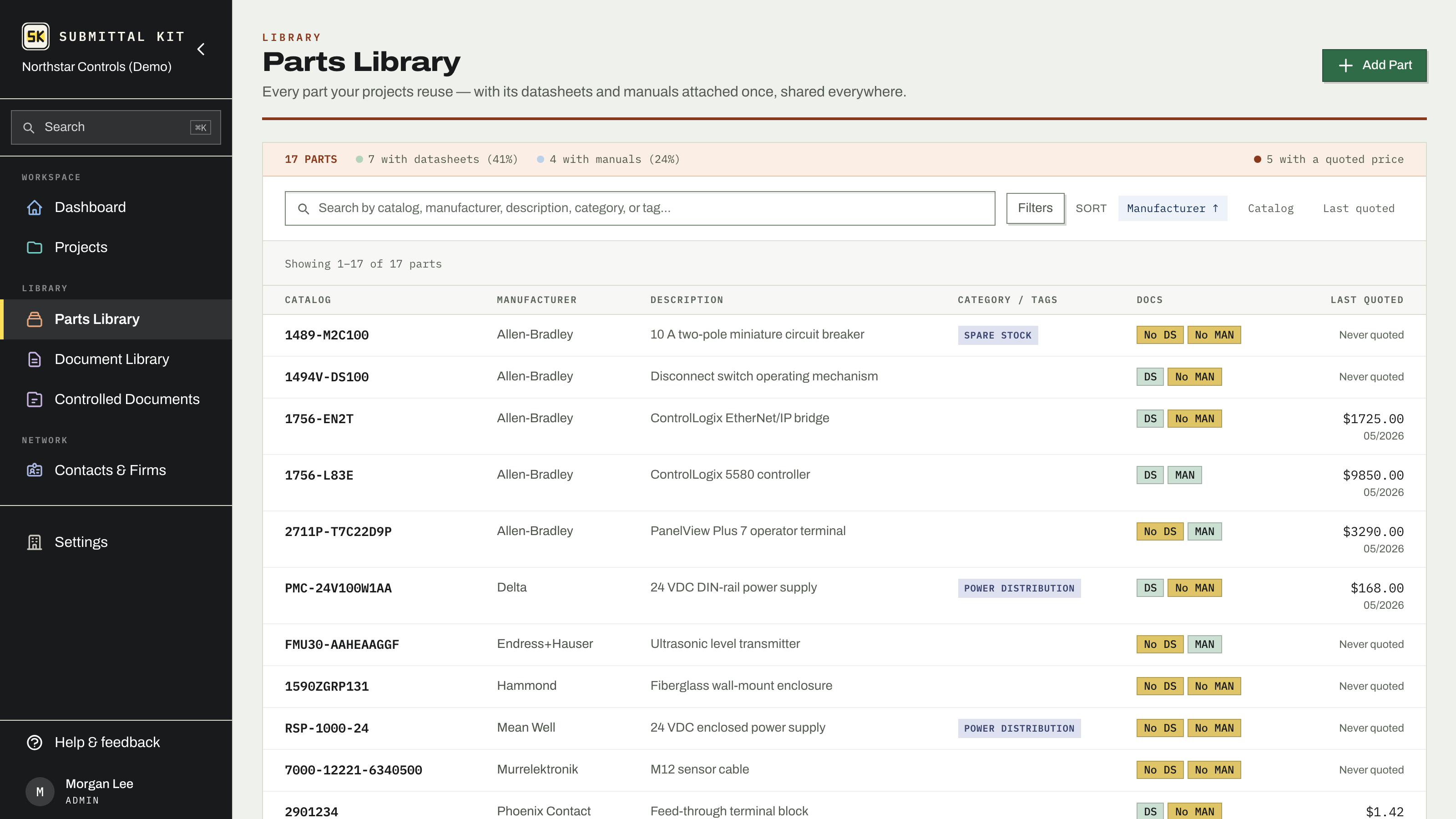
Open Parts to see the whole library: catalog number, manufacturer, description, category and tags, document status, and the last quoted price with its date. Search matches catalog numbers, manufacturers, descriptions, categories, and tags. Behind the filter disclosure sit Manufacturer, Category, Tags, and three gap filters that make cleanup lists for you: Missing datasheet, Missing manual, and Never quoted.
Delete in bulk
Check the parts you want to remove, or check the box in the bar above the list to take the whole page. With a page selected, Select all matching widens the selection to every part your search and filters match. Delete lists which parts it will skip and why: a part that is still on a project's register, a quote, or a purchase order stays, the same rule as deleting one part.
The part page
A part carries its catalog number, product name, manufacturer, description, category, and tags. The product name is read off the attached datasheet and shows wherever the catalog number does. The manufacturer field is a combobox backed by manufacturer profiles, so "Rosemount" and "ROSEMOUNT INC" resolve to the same maker instead of splitting your library. Categories and tags are shared vocabulary; see Library vocabulary.
Short on descriptions? Generate from datasheet writes one from the datasheet you attach, with live progress and a Stop button. The result comes from the document itself, so it says what the sheet says.
A facts strip summarizes the part at a glance: last quoted, best price, lead time, what's on order, document counts, and where the part is used across projects.
Merge duplicates
When two library entries plausibly name the same part (a quote's full ordering code next to your catalog number, for instance), the part page flags a Possible duplicate and offers Merge into this part. Merging moves the twin's datasheets, re-points every register and submittal item, and carries its pricing history and purchase order lines to the surviving part, then deletes the twin.
If a quote line was filed against the wrong part, use Move on that price line to send it to the right one.
Pricing
The Pricing panel lists every quoted price across every project, newest first, with vendor, quantity basis, lead time, and a link to the quote behind it. Below it, On order shows the part's open purchase order lines with promised dates. See Quotes and purchase orders.
Parts arrive on their own when you import a BOM; you rarely need to create them by hand. Attach documents from the part page: Part documents.
Updated Sep 23, 2026
Can't find it? [email protected]